
Treat each unavailable item as its own fulfilment record
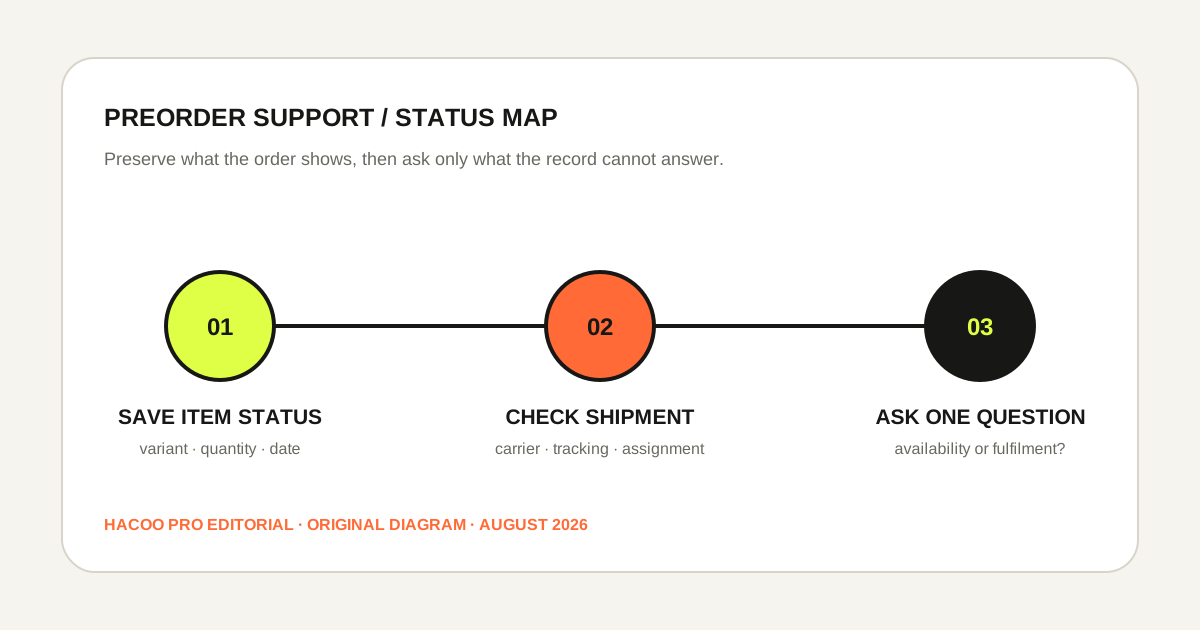
When a Hacoo item is described as a preorder or backorder, save the wording shown for that exact order line, along with the variant, quantity, order date and current status. Then check whether the line has been assigned a shipment. Do not count from an estimated delivery range while the item is still unshipped, and do not assume that another item in the same order will wait for it.
Hacoo's current shipping information says products that are available may be shipped immediately, while preordered or backordered products may be delivered later. That wording establishes the possibility of split fulfilment. It does not establish a universal release date, a guaranteed dispatch day or a promise that every mixed order will split in the same way.
What can be stated from the current public pages
- Available lines
- They may be shipped before unavailable lines.
- Preorder or backorder
- The item may be delivered later.
- Tracking
- Logistics Details is reached through Account and My Orders.
- Delivery estimates
- Published shipping times are guidelines rather than a guaranteed date.
Separate the official baseline from assumptions
The useful official baseline is narrow. Hacoo publishes general processing and regional shipping guidance, explains that receiving time combines processing and shipping, and warns that shipping ranges are not guarantees. The same shipping page explains that available and unavailable products may travel at different times. Those points help you classify the order, but they do not reveal the live inventory position of a particular colour, size or seller.
A creator post, old product screenshot or another buyer's delivery date cannot fill that gap. It may describe that person's experience, but it does not update your order. The order screen and official support response are the records that can identify whether your line is awaiting availability, preparing, cancelled, refunded or assigned to a shipment.
Use exact language when you take notes. “Preorder shown on August 11” is an observation. “Will ship next Tuesday” is a prediction unless the live order or an official response actually supplies that date. This distinction makes later support messages shorter and prevents an estimate from becoming an invented promise.
Build a status record before anything changes
- 1Identify the precise line.
Record the product name, selected size or version, colour and quantity. Similar thumbnails are not enough when variants differ.
- 2Save the availability wording.
Capture the preorder or backorder label and any date or condition actually displayed. Include enough of the order screen to preserve context.
- 3Record the order status and time.
A dated note lets you show how the status changed without claiming that a screenshot is current forever.
- 4Check shipment assignment.
Look in Logistics Details for a carrier and tracking number linked to the item or order. No tracking means there is no carrier journey to follow yet.
- 5Keep payment and support references privately.
Preserve the order identifier and case number, but do not expose addresses, phone numbers or payment details in public posts.
Repeat the check after a meaningful status change, not every few minutes. A small table with date, visible wording, shipment reference and action taken is usually more useful than a folder of near-identical screenshots.
Run two clocks: preparation and carrier movement
The first clock begins with the order and covers availability and preparation. The second begins only after a shipment is assigned and a carrier record exists. Hacoo's public shipping page describes processing separately from shipping, so adding an estimated carrier range to an item that has not shipped mixes two different stages.
| Visible state | Useful action |
|---|---|
| Preorder or backorder; no tracking | Preserve the availability wording and ask about the line's current fulfilment status if the order does not explain it. |
| Available item has tracking; preorder line does not | Treat the order as potentially split and monitor each line separately. |
| Preorder line receives tracking | Switch to the carrier record and compare its events with Logistics Details. |
| Status changes without explanation | Save before-and-after records and ask what the new status means for that exact line. |
| Another parcel arrives first | Reconcile delivered contents without reporting the unshipped line as missing from that parcel. |
This model also prevents double counting. A published receiving estimate includes stages; it should not be restarted or extended with invented numbers. Use any live estimate only as the page presents it, note the check date and ask support when the order-specific record is unclear.
Use a decision check before contacting support
Is the item still labelled preorder or backorder?
If yes, record the label and look for order-specific information. If the wording has disappeared, preserve the earlier record and note the current status instead of continuing to describe the page as though nothing changed.
Does the item have its own shipment reference?
If yes, the question has moved from availability to logistics. If no, a carrier cannot explain the delay. Ask about fulfilment or shipment assignment, not why tracking has stopped.
Did another line already ship or arrive?
If yes, a split is plausible under Hacoo's published wording. Match the delivered parcel to its tracking number and contents. Do not assume the remaining line was packed in that parcel unless the order record assigns it there.
Is there a live date, or only a general estimate?
Quote only what the order actually displays. When there is no item-specific date, ask whether one is currently available. Do not borrow a date from a creator, review or different order.
Send one support message with one answerable question
A useful message names the order, exact line, variant, quantity, visible availability wording, current order status and whether a tracking number exists. Attach the smallest set of screenshots that proves those points. Then ask: “Is this line still awaiting availability, preparing for shipment, or assigned to a separate shipment?”
If a live date was displayed and has passed, include that date and the screenshot. Ask for the current status and available options; do not demand a policy outcome that the public page does not promise. If cancellation, billing or refund becomes relevant, use the current official order flow and conditions for the item rather than relying on a generic article.
Keep all replies in the same case when possible. A single timeline is easier to investigate than several messages that use different labels for the same line. Save the case reference and date of each response.
Two examples that keep the stages separate
Available top and backordered shoes
The top has a tracking number; the shoes remain labelled backorder with no tracking. Record both lines separately. Follow the top through the carrier and ask about the shoes' fulfilment status only if the order page does not answer it. The top's delivery does not make the shoes a missing item.
Preorder label replaced by preparing
Your earlier screenshot shows preorder, while the current order shows preparing and still has no tracking. Save both states and ask whether the line is now in fulfilment and whether shipment assignment is pending. Do not estimate dispatch from the status label alone.
Questions about Hacoo preorder support
Does preorder mean the item will arrive on a fixed date?+
Not from the public shipping wording alone. Use an order-specific date only when the live record or official support provides it, and preserve the date checked.
Can available items arrive before a backordered item?+
Yes, Hacoo's current shipping page says available products may ship immediately while preorder or backorder products may be delivered later. Check the actual shipment assignments for your order.
Can I track a preorder before it ships?+
You can track its order status, but carrier tracking requires a shipment reference. Save the availability status until Logistics Details shows a carrier and number.
Should I publish my screenshots to get advice?+
No. Keep order identifiers, addresses, phone numbers, payment data and support messages private. Share evidence only through an official support route when needed.
Continue with the matching internal guide
Choose the next checklist by the item's current stage.
- Shipping planning — distinguish preparation from delivery estimates.
- Partial-order checklist — reconcile parcels after another line arrives.
- Wrong-address checklist — preserve the order address and shipment state before requesting a correction.
- Research workflow — verify the live destination before relying on saved details.
- Hacoo Pro FAQ — understand this independent site's role and limits.
- Research articles — browse the full English article index.
Ask about the line, not the whole timeline.
Save the exact availability wording, current status and shipment assignment. One precise record gives support a clear place to start.