
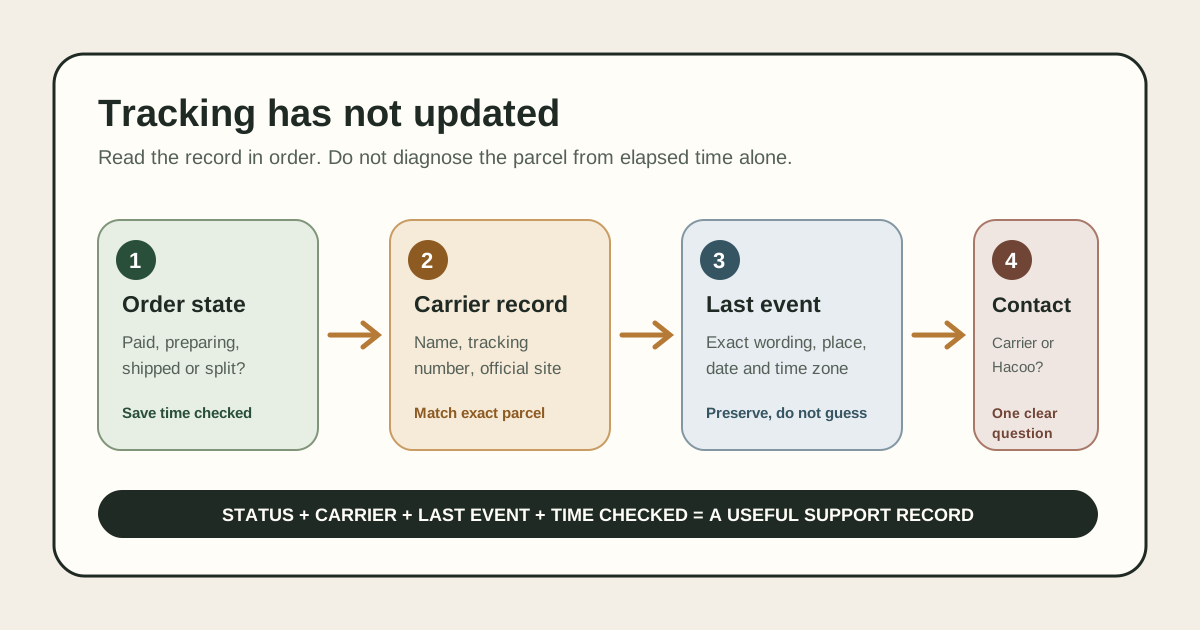
Read the last confirmed event before deciding that tracking is stuck
When Hacoo tracking is not updating, open the exact order and record its current status, carrier, tracking number, last event, event location, displayed time and the time you checked. Confirm that every item you expect is assigned to that parcel. Then compare the same number on the carrier destination reached from the official Logistics Details screen.
Do not diagnose a lost parcel from elapsed time alone. A quiet record can mean the order is still being prepared, the label exists before the carrier's first physical scan, data is moving between systems, the parcel is between checkpoints, or an exception needs attention. The visible order and carrier records tell you which question to ask; they do not guarantee the answer.
What the current public instructions support
- Where to start
- Account, My Orders and Logistics Details.
- What is shown
- The carrier and tracking number associated with the shipment.
- Carrier access
- A browser control to open the carrier site and a phone control for carrier customer service.
- What is not promised
- No universal public waiting threshold proves that an unchanged event is a loss.
Use the official tracking path as the identity record
Hacoo's current public help page directs users to Account, then My Orders, then Logistics Details. It says this view shows the carrier and tracking number, with controls that open the carrier's website or carrier customer service. This path matters because a number copied from an old email, screenshot or creator post may belong to another parcel or contain a transcription error.
Check the live order on every review. If an order is split, one order can lead to more than one shipment record. A delivered parcel for one group does not prove that every order line travelled in it. Match the item lines to the tracking reference before asking why an item has no scan.
Use Hacoo's status for the order relationship and the carrier's record for physical transport events. If they differ, save both with times instead of choosing the more reassuring screen. A timestamped mismatch is useful evidence for support.
Classify the silent record into one of four states
1. No carrier or tracking number yet
This is primarily an order-preparation question, not a carrier-tracking problem. Record the item and order statuses. If a preorder, backorder or split fulfilment is shown, follow that evidence rather than treating the missing number as a transport failure.
2. Tracking number exists, but there is no carrier event
A number can appear before a first physical scan is visible. Confirm the carrier, exact number and assignment time if displayed. Ask whether the parcel has actually been handed to the carrier; do not describe “label created” as movement.
3. One or more events exist, then stop changing
Preserve the exact last event and location. Phrases such as departure, arrival, transfer, customs review or delivery attempt describe different responsibilities. Do not translate an unfamiliar event into “lost.” Use the carrier's own wording and event sequence.
4. An explicit exception appears
An address problem, failed attempt, customs request, return movement or other exception is more actionable than silence. Save the text before it changes, then use the official party identified by the event. Never send identification, payment or security codes through a link copied from an unsolicited message.
Build a seven-field tracking evidence pack
- 1Order reference.
Keep the complete number private; use only a short ending in a public note.
- 2Expected items.
List the relevant order lines and whether the app groups them into this shipment.
- 3Order status.
Copy the wording and the date and time you checked it.
- 4Carrier and number.
Copy them from Logistics Details and verify the number character by character.
- 5Last carrier event.
Record its exact text, location, date and displayed time zone when available.
- 6Record comparison.
Note whether Hacoo and the carrier agree or which fields differ.
- 7Previous action.
Save any case number, carrier contact and reply so the next contact does not restart the timeline.
A useful message can fit on one screen when these fields are prepared. Repeatedly refreshing a status supplies no extra context; recording a changed event does.
Compare records without inventing a deadline
| Visible evidence | Best interpretation | Next question |
|---|---|---|
| Preparing; no shipment record | Carrier movement has not been established. | Which item is waiting, and has the parcel been submitted? |
| Number assigned; carrier has no event | A label or data record may precede carrier acceptance. | Has the parcel been physically handed to this carrier? |
| Carrier event exists; no later event | The last scan identifies the current evidence boundary. | Does the carrier consider the shipment moving normally or under investigation? |
| Hacoo and carrier show different states | Systems may not have synchronized. | Which record currently controls the next operational step? |
| Explicit exception or failed attempt | A specific action may be required. | What evidence or action does the official carrier or Hacoo request? |
Hacoo publishes delivery guidance elsewhere, but an estimate is not a scan schedule or guaranteed escalation point. Route, destination, handoff and customs circumstances can vary. This guide therefore does not create a fixed number of hours or days after which every quiet record should be treated the same.
Contact the party that owns the current stage
If there is no carrier assignment, start with official Hacoo order support because the question concerns preparation or shipment creation. If the carrier has accepted the parcel and publishes the last event, use the carrier control provided from Logistics Details for event-specific questions. When records conflict, keep one Hacoo case containing the carrier evidence.
A precise request is: “Order ending 1234 shows shipped with carrier X and tracking ending 5678. The carrier's last event was [exact wording] at [location and time], checked at [time]. Hacoo currently shows [status]. Is this parcel still within the expected handoff, or should a carrier trace or Hacoo review be opened?”
Ask one answerable question. Do not open several cases with different descriptions or claim a parcel is lost before the responsible party confirms that conclusion. Keep replies and case references in one timeline.
Three tracking examples
A paid item with no tracking
The order still shows preparation. The correct evidence pack starts with item status, not a carrier screenshot. Check whether the item is a preorder or assigned to a later shipment, then ask when or whether it will enter a parcel.
A number with no first scan
Logistics Details identifies the carrier, but the carrier has no event. Verify the number and save the assignment time. Ask whether physical handoff occurred. Avoid assuming that the parcel is moving simply because a label exists.
A handoff mismatch
Hacoo shows shipped while the carrier still shows an earlier transfer event. Save both records at the same time. Contact the carrier about the published event and add that response to one Hacoo case if the mismatch persists.
Questions about Hacoo tracking not updating
Where should I find the Hacoo tracking number?+
The current public instructions point to Account, My Orders and Logistics Details, where the carrier and tracking number are shown.
Does a tracking number prove carrier acceptance?+
No. Look for the first physical carrier event and ask whether handoff occurred when the record remains empty.
How long can tracking stay unchanged?+
No one threshold verified here applies to every route and event. Use the exact last scan, carrier record and current official guidance for that shipment.
Should I publish my tracking number for help?+
No. Keep the complete order and tracking references inside official Hacoo and carrier support channels.
Continue with the matching internal guide
Choose the next page by the evidence now shown.
- Shipping planning — separate preparation from carrier movement.
- Split-shipment checklist — match items to multiple parcel records.
- Preorder support — check why an item has not entered a shipment.
- Wrong-address evidence — act when tracking reveals an address problem.
- Delivered-but-missing checklist — verify a completed carrier scan and local handoff evidence.
- Hacoo Pro FAQ — understand the limits of this independent guide.
Describe the record, not the fear.
Match the order, parcel, carrier and last event, then give the responsible party one timeline it can investigate.